A server rack is more than a cabinet. Its accessories determine how equipment is mounted, powered, cooled, grounded and maintained. Choosing compatible rack accessories helps prevent cable strain, blocked airflow and avoidable service interruptions. This guide explains what to check before selecting server rack accessories in Sri Lanka, with examples from Richcom’s range.
Start with the rack itself: confirm its usable depth, width, mounting profile, unit capacity and load rating. Then map the equipment that must fit inside it, including switches, servers, UPS units and power distribution. Leave space for future growth and service access. The server rack accessories in Sri Lanka category includes power and physical installation components; check each item’s exact dimensions and compatibility before ordering.
What do server rack accessories do?
Rack accessories support four practical needs. Mounting parts hold equipment securely. Cable-entry and management parts guide data and power leads. Power accessories distribute electricity to rack devices. Cooling, monitoring and grounding components help protect equipment and support maintenance. A well-planned rack combines these parts around the equipment layout instead of treating each purchase as a standalone item.
Check rack size and compatibility first
Most rack equipment uses a standard 19-inch mounting width, but depth, rail position, mounting-hole pattern and available U space still matter. Measure the usable space between the front and rear rails, not only the cabinet’s external depth. Check whether the accessory is intended for a specific rack series or profile. Also verify fasteners, load support and access to doors or side panels. A product can be the right nominal width and still conflict with a door, cable path or neighbouring device.
Choose power distribution for the actual load
A basic rack PDU provides outlets; a metered model helps operators see current draw; a switched PDU can control outlets remotely. Select input voltage, plug type, current capacity, outlet count and outlet orientation to match the site and connected equipment. Include the combined load and allow headroom, and have a qualified electrician verify circuit protection and supply compatibility. For a detailed planning reference, see Schneider Electric’s guide to choosing IT rack power distribution.
High-density racks may benefit from outlet-level visibility and remote switching, but those functions add configuration and management needs. Confirm network access, monitoring requirements, alarm behaviour and who will administer the PDU. Avoid daisy-chaining power strips unless the manufacturer and local electrical rules explicitly allow the arrangement.
Compare server rack accessories for power and fit
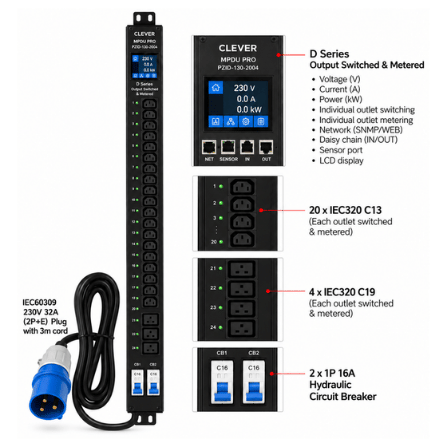
Clever (China) MPDU Pro D Series 0U 24-Way IEC C13/C19 Outlet Metered and Switched PDU – PZID-130-2004 (3Y)
This 0U managed PDU is designed for vertical rack installation and combines metering with switched outlets. Its listed configuration has twenty C13 and four C19 outlets, a 230V 32A IEC60309 input and a 3-metre cord. Remote monitoring, outlet control, alarms and logs can help administrators manage a dense rack. Before choosing it, check that the site supply and protective circuit support the stated input, that the plug matches the installation, and that the rack has suitable vertical mounting space. Plan outlet assignment and load balance across connected equipment.
TIMIK (Canada) 19″ DATCET Server Rack PDU Mounting Profile Dual 42U – 19A DCPDUMD42
This 42U dual PDU mounting profile is a rack mounting component, not a complete power distribution unit. Its purpose is to provide a compatible mounting position for rack PDUs. Confirm the rack series, mounting profile, usable height and fixing points before ordering. Check that the planned PDU’s length and bracket arrangement suit the profile, and that the finished installation leaves cables and outlets accessible. The profile is listed at 1.2mm thickness, so confirm the intended load and installation method with the supplier for the specific rack setup.
Manage cable entry and routing
Organized cabling makes service work easier and reduces the chance that a patch lead, power cord or fibre jumper will be pulled loose. Separate power and data routes where practical, label both ends, maintain bend radii and leave enough slack for equipment movement. Cable entry plates close unused openings while allowing planned cable paths; brush or gland solutions can help limit dust entry, depending on the rack design. Verify dimensions, cut-outs and mounting points before selecting a plate.
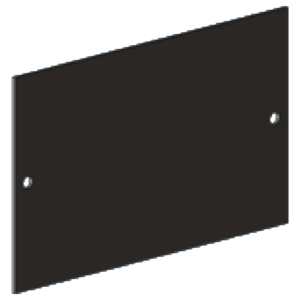
TIMIK (Canada) 19″ Cable Gland Plate A 155×84 – 19A CGPAB
This 155×84mm cable gland plate is a physical cable-entry accessory for compatible rack openings. Its listed thickness is 1.5mm. Measure the intended opening and check the fixing pattern before purchase; also confirm the cable bundle size and whether separate glands or grommets are required. A correctly sized entry plate can keep cable routing deliberate while helping close an otherwise open panel cut-out.
Plan airflow, cooling and equipment access
Rack layout affects cooling. Keep front-to-back airflow paths clear, install blanking panels in unused spaces where appropriate, and avoid bundling cables across fan intakes or exhausts. Check whether servers and switches exhaust hot air in the same direction and whether the room’s cooling can remove the combined heat load. A rack fan or ventilation accessory cannot compensate for inadequate room cooling or blocked ventilation. Leave enough rear clearance to service connections and replace equipment.
Grounding, security and monitoring
Use rack earthing components according to the cabinet manufacturer’s instructions and the building’s electrical design. Grounding should be planned by a qualified professional, with appropriate bonding between the cabinet, doors and relevant metal parts. For shared or accessible equipment rooms, consider locks and access controls that fit the rack while preserving emergency access. Temperature, humidity, door and power monitoring can alert staff to changing conditions; decide who receives alerts and what response process follows.
Installation checklist for server rack accessories
- Record rack make, model, usable depth, U capacity, rail spacing and load rating.
- List every device, its dimensions, weight, airflow direction and power connector.
- Map outlet count and electrical load; confirm voltage, phase, plug and circuit capacity.
- Plan separate, labelled routes for data and power cables, including future capacity.
- Check that accessories do not block doors, rails, vents, service points or other equipment.
- Confirm included hardware, required tools and any electrician or network configuration work.
- Photograph and document the finished rack so later changes remain maintainable.
How to choose the right server rack accessories in Sri Lanka
Choose items as part of a rack plan. For a small cabinet, accurate measurements and cable entry may be the immediate priority. For a dense server installation, power visibility, outlet control, airflow and service access deserve closer attention. Compare specifications instead of relying on product names alone, and confirm stock, compatibility and warranty details with the supplier because product configurations can vary.
Frequently asked questions about server rack accessories
Do all rack accessories fit every 19-inch cabinet?
No. Width is only one factor. Depth, rail design, mounting holes, U height and the rack series can affect fit. Check the cabinet and accessory specifications together.
Is a PDU mounting profile the same as a PDU?
No. A mounting profile is a structural part used to mount compatible equipment. It does not distribute power. Confirm the product description and required companion hardware.
Should I choose a metered or switched PDU?
Metering helps track electrical load. Switched outlets add remote power control. Select functions based on monitoring and recovery requirements, and confirm network security and administration arrangements.
Who should install rack power and grounding equipment?
Use a qualified electrician or infrastructure professional for supply circuits, protective devices and grounding. Follow local electrical requirements and equipment manufacturer instructions.
With measurements, load information and a clear cable and airflow plan, it is easier to select compatible rack components and keep the installation
serviceable as it grows.