A power distribution unit (PDU) takes power from a source and distributes it to equipment in a rack. Choosing a suitable rack PDU means checking more than the number of outlets. Input connector, circuit capacity, outlet types, mounting position, protection, monitoring and the rack’s future load all affect whether a unit fits the installation. This guide explains how to compare power distribution units in Sri Lanka for small network cabinets and high-density server racks.
Start by listing each device, its power supply connector and expected consumption. Then map the circuit or UPS feeding the PDU. Avoid treating the maximum rating as a target: leave operating margin and have a qualified professional verify the electrical design. See the Schneider Electric data centre solutions resource for broader context on resilient facility power design.
Basic, metered, monitored and switched PDUs
A basic PDU distributes power through a fixed set of outlets. It is appropriate when loads are known, local access is available and remote visibility is not required. A metered model adds a display or measurement function so staff can review current or voltage at the unit. A monitored PDU can report data to management software, while a switched PDU can also control individual outlets or groups, depending on the model.
These functions serve different needs. Monitoring helps teams spot an unexpected increase in demand or confirm which rack is drawing power. Switching can support a controlled remote restart, but it should be protected by access controls and a clear change process. Confirm whether the specification describes total load monitoring or outlet-level data; the distinction matters in a dense cabinet.
Check input, capacity and outlet compatibility
Before selecting a PDU, compare its input plug and electrical rating with the site circuit. Verify voltage, phase, frequency, current and the protective device upstream. The input connection often limits total available power even when the PDU has many outlets. Confirm that the supply cable length reaches safely and that no adapter or extension creates an unverified weak point.
Next, count and classify the device plugs. IEC C13 outlets commonly serve many network and server devices, while some higher-power equipment uses C19. Match each outlet to the equipment power cord and confirm the per-outlet and total circuit ratings. Do not infer capacity from outlet count alone. Load balancing, startup demand and planned equipment growth should be considered before commissioning.
Choose horizontal or vertical rack mounting
A horizontal 1U PDU uses front or rear rack space and can be convenient in a compact cabinet. Check clearance behind the rails, cable bend radius and access to adjacent equipment. A vertical 0U PDU mounts along the rack side and preserves rack units for servers or switches. Measure the cabinet height and available side space, then confirm the PDU dimensions, bracket arrangement and door clearance.
Plan cable routing before installation. Keep power cords away from blocked fan paths, label both ends and avoid tight bends. Leave enough slack for servicing without allowing loops to obstruct airflow. If two PDUs are used for redundant equipment, plan their mounting and cord paths so a technician can distinguish the separate power feeds easily.
Compare rack PDU options for different installations
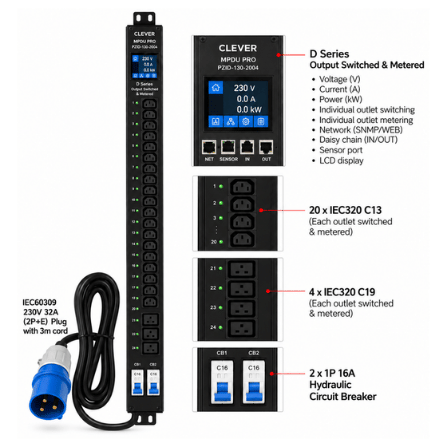
Clever (China) MPDU Pro D Series 0U 24-Way IEC C13/C19 Outlet Metered and Switched PDU – PZID-130-2004 (3Y)
This managed vertical model is designed for a dense rack that needs both outlet metering and switching. Its listed configuration has 20 C13 outlets and four C19 outlets, a 230V 32A IEC 60309 input, a 3 m cord and two 16A hydraulic magnetic circuit breakers. Confirm the facility supply, outlet-level control requirements and exact management platform before selection. Because it is a high-capacity design, installation should be checked by a qualified electrical professional.
Clever (China) MPDU Pro B Series 0U 24-Way IEC C13/C19 Outlet Monitoring PDU – PZIB-130-2004 (3Y)
The B Series is a 0U managed PDU focused on outlet monitoring. The listed version also provides 20 C13 and four C19 outlets, with 230V 32A input, IEC 60309 connection, a 3 m cord and dual 16A hydraulic breakers. It can be a fit when operators need visibility into rack power at outlet level but do not require the D Series switching function. Confirm compatible controller, network management and any environmental sensors needed for the deployment.
TIMIK (Canada) Switched PDU 8 Ports x IEC 320-C13 Sockets, Type G Input, 16A, 1U with Digital Ammeter and SNMP – AMzH-1623G/SW-08-1
This 1U horizontal TIMIK option offers eight C13 outlets, a Type G input, a stated 16A/230V configuration, a digital ammeter and SNMP. It suits a smaller rack where network monitoring is useful and horizontal mounting is preferred. The product listing also identifies a circuit breaker. Verify outlet control capabilities, supported SNMP functions and exact input wiring with the seller, because similar model variants may use different ratings or mounting styles.
Plan monitoring, network access and alerts
For network-managed models, identify who needs access and how alerts should be handled. Use a dedicated management network where practical, change default credentials and restrict access to approved administrators. Confirm whether the PDU supports the monitoring protocol already used by the operations team, which measurements are exposed and how notifications are delivered. Test alerts after installation so that a power warning reaches someone who can act on it.
Remote outlet control can affect business services. Document outlet labels, connected equipment and recovery steps. Use a controlled approval process before switching a critical load, and keep local access available for maintenance. A PDU does not replace a UPS, generator or correctly engineered redundant feed. It distributes the available source and may add useful visibility or control.
Install and maintain your rack PDU safely
- Record the expected load and leave margin for growth.
- Confirm site voltage, phase, current, plug type and circuit protection.
- Match every device cord to the correct outlet type and rating.
- Check rack height, 1U or 0U mounting clearance and cable reach.
- Route cords to preserve airflow and access to service panels.
- Label the PDU input, each outlet and the upstream power source.
- Have a qualified electrician verify earthing and the complete supply path.
- Test monitoring, alerts and any outlet control in a planned maintenance window.
Common mistakes when buying a rack PDU
Choosing by outlet count alone can leave the rack short of power capacity or with the wrong connectors. A high-current input does not guarantee that the available building circuit can deliver that rating. A managed feature set is also not automatically beneficial if no team owns monitoring or secures the management interface. Finally, remember to consider physical placement: a unit that fits electrically may still block a door, consume needed rack units or make cable service difficult.
Frequently asked questions
Does every rack need a managed PDU?
No. A basic model may be enough for a small, attended rack with stable loads. Monitoring and switching can help when staff manage several cabinets or need remote visibility, but only if the features match an operating need.
Can I connect C19 equipment to a C13 outlet?
Only when the device, cord, adapter and outlet ratings are explicitly compatible. Check manufacturer documentation and avoid assuming that a physical adapter makes an electrical connection safe.
What information should I confirm before ordering?
Confirm the full model code, input connector, current and voltage rating, outlet types, number of outlets, monitoring or switching functions, dimensions, mounting hardware and warranty. Browse the server rack power distribution unit prices in Sri Lanka category to compare currently listed configurations; verify details with Richcom before purchase.
A reliable rack power plan begins with an accurate load list and a compatible source. Match the PDU to the devices and cabinet, document the feed, and arrange qualified review for the electrical installation. That process makes it easier to choose a distribution unit that supports today’s equipment while leaving a clear path for future changes.