
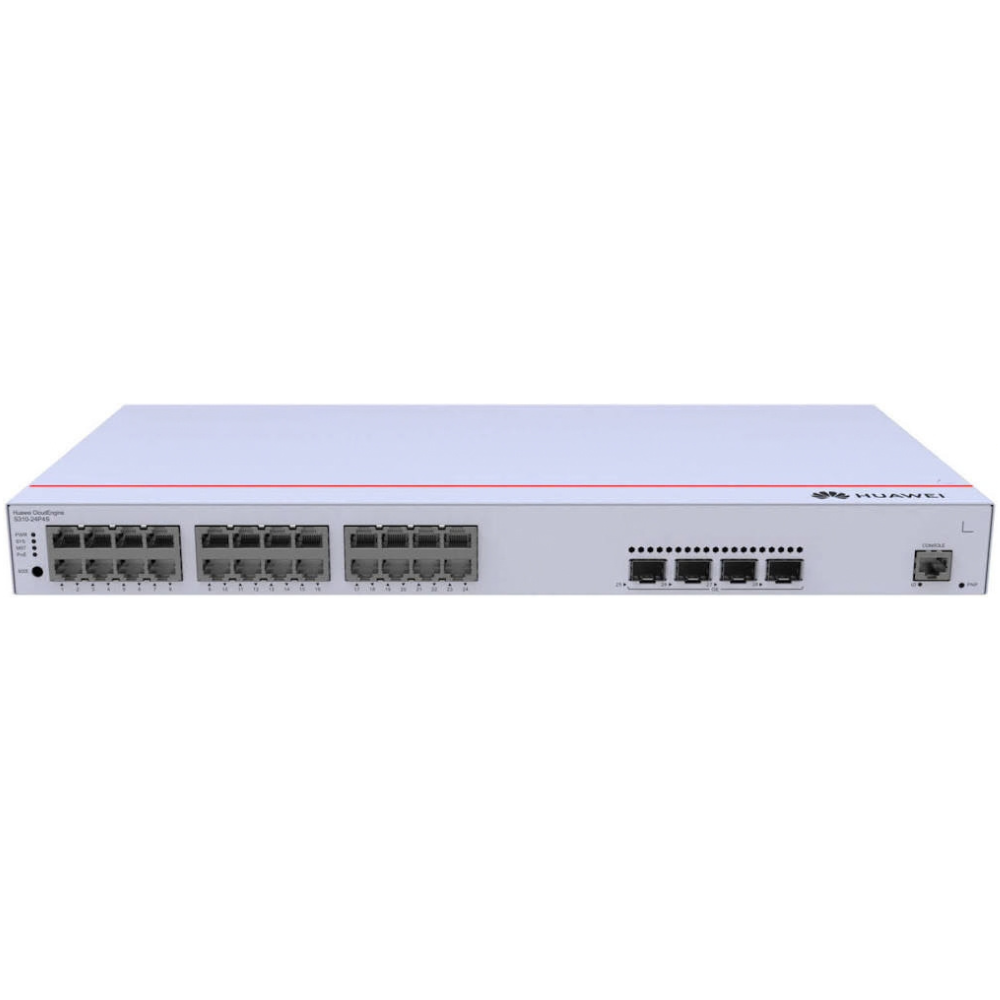
This Huawei switch buying guide compares eKitEngine options from straightforward unmanaged access products to managed Layer 2 and Layer 3 platforms. Choose by counting connected devices, checking whether endpoints need Power over Ethernet (PoE), and matching uplink speed and management features to your network team. The three Richcom models below show how port configuration, routing and shared PoE capacity affect the right fit.
For the current range, compare Huawei network switch prices in Sri Lanka by model and configuration. Product availability and specifications can vary, so confirm the exact model suffix, power budget and included accessories before ordering.
Start your switch selection with a device count
Start this Huawei switch buying guide with your device list. Write down the number and type of devices that will connect to the switch. Count computers, printers, access points, IP cameras, phones, servers and links to other switches. Add spare capacity for planned growth, but avoid selecting a larger switch solely because its headline port count looks better. The 24-port models below are aimed at installations that need a combination of access ports and higher-speed backbone connections.
Next, decide whether the switch should provide PoE. A non-PoE switch carries network data only; every connected endpoint needs a separate power source. PoE models can power compatible access points, cameras and phones over Ethernet, which can simplify cabling and reduce the need for outlets at each device. Confirm the device’s PoE standard and wattage requirement against the switch documentation, and total the expected load. A switch’s shared PoE budget is not the same as power available per port.
Switch selection: managed or unmanaged?
An unmanaged model is suited to a small, simple network where plug-and-play connectivity is enough. A managed switch adds configuration and monitoring options. Depending on the model, these may include VLANs, link aggregation, traffic prioritisation, access controls, monitoring, and loop or redundancy features. These tools can help separate staff devices, guest access, cameras and servers into distinct network segments. They also require someone to plan, configure and maintain the network.
Layer 2 management focuses on switching within local networks. Layer 3 features add routing between IP networks or VLANs. A Layer 3 switch can reduce the need to send all inter-VLAN traffic through a separate router, but it still needs a deliberate IP addressing and routing design. Do not pay for advanced routing unless the network layout or administrator’s requirements call for it.
Network design: check uplinks and bandwidth
Access ports connect endpoint devices; uplinks connect the switch to another switch, router, server or network backbone. The models compared here have different combinations of Gigabit SFP, 2.5 Gigabit SFP and 10 Gigabit SFP+ ports. Optical ports need compatible transceivers and fiber. Check the fiber type, wavelength, connector, distance and speed at both ends. A link is only as fast as its slowest component, so make sure the other device and module support the selected rate.
For multi-floor offices, server rooms or busy camera networks, uplink capacity can matter as much as the number of RJ45 ports. If many access devices share one uplink, estimate their expected traffic and consider whether multiple uplinks or link aggregation are appropriate. Copper Ethernet also has distance limits; use fiber where the link length or electrical isolation requirements call for it.
Three Huawei switches to compare
Huawei (China) eKitEngine 24-Port Gigabit L3 Managed Switch with 4SFP-S310-24T4S (3Y)
This non-PoE managed model suits a business that needs 24 Gigabit access ports, fiber uplinks and Layer 3 capability. Richcom lists four GE SFP interfaces alongside its 24 copper ports. Huawei’s series data sheet identifies 56 Gbit/s switching capacity and 42 Mpps forwarding for this model. It supports Layer 3 functions and managed network features, making it a practical fit where the team needs VLAN segmentation and routing capability but does not need the switch to power endpoints.
Choose it for an office, school, commercial building or distribution cabinet with separately powered computers, servers, printers or access points. Budget for any SFP modules and fiber patch leads required for the uplink; verify these accessories are included or source them separately. The built-in AC power supply and 1U chassis suit standard rack installation. Confirm rack depth, ventilation and power backup requirements before installation.
Huawei (China) eKitEngine 24-Port Gigabit PoE+ L2 Managed Switch with 2×10GE SFP+ & 2×2.5GE SFP-S220S-24LP4JX (3Y)
The next model in this Huawei switch buying guide combines 24 Gigabit PoE+ ports with two 10GE SFP+ and two 2.5GE SFP uplinks. It is suited to sites that need to power compatible endpoints while carrying heavier traffic toward the core. Huawei lists a shared 195 W PoE budget, 98 Gbit/s switching capacity and 73 Mpps forwarding rate for the model. Its multiple uplink speeds provide room to match different backbone connections, subject to compatible transceivers and equipment.
It can suit a small or medium business deploying cameras, wireless access points or VoIP phones, especially when PoE capacity and uplink bandwidth are both important. Calculate the combined device load against the 195 W budget, leaving practical headroom for growth. This is a managed Layer 2 product, so do not treat it as interchangeable with a Layer 3 switch when routing between VLANs is required. Review the management method, mounting location and cooling arrangements as part of the system design.
Huawei (China) eKitEngine 24-Port Gigabit PoE+ L3 Managed Switch 400W with 4×GE SFP-S310-24P4S (3Y)
This is the high-capacity choice in the comparison for installations that need PoE, advanced management and Layer 3 functions. The listed configuration provides 24 Gigabit PoE+ access ports, four GE SFP uplinks and a 400 W shared PoE budget. Huawei’s S310 data sheet specifies 56 Gbit/s switching capacity and 42 Mpps forwarding. It also describes Layer 3 routing functions, VLAN support, security features and stack options for the series.
Consider it for a larger camera or access-point deployment, a multi-floor office, or another site where a significant number of powered devices share one switch. Plan the PoE load carefully; 400 W is the combined budget across supported ports, not 400 W per port. Also account for the switch’s own power draw, rack ventilation and UPS capacity. If your endpoints need higher-speed uplinks than GE SFP, compare the S220S model above or select a different platform with matching port speeds.
How to choose for common Sri Lankan deployments
To apply this Huawei switch buying guide to a small office with computers, printers and a few separately powered access points, prioritise the required port count and management level. For an IP surveillance installation, map cameras to switch ports, check each camera’s power requirement and determine how much recorded video traffic will travel over the uplinks. With Wi-Fi, consider the access point’s Ethernet speed and PoE needs rather than assuming all models draw the same power.
In schools, hotels and multi-floor buildings, VLANs can help organise users, guest networks, cameras and building systems. Fibre uplinks may make sense between floors or buildings. Ask the network designer to check the switch’s uplink arrangement, routing needs and management workflow against the existing core. If the network already uses a vendor management platform, verify compatibility and licensing requirements before choosing.
Network design and installation checklist
- Confirm the exact model and suffix, port count, PoE type and total power budget.
- Record every endpoint, its speed and whether it needs power from the switch.
- Check uplink speed, fiber type, transceiver compatibility and required link distance.
- Verify rack space, airflow, ambient temperature, electrical supply and UPS capacity.
- Plan VLANs, management access, administrator credentials and firmware maintenance.
- Label both ends of every cable and document switch ports, uplinks and connected devices.
- Test endpoint connectivity, PoE operation, VLAN membership, monitoring and failover before handover.
Switch selection mistakes to avoid
Do not choose a PoE switch by port count alone. A full set of powered endpoints can exceed the shared power budget even when every port is compatible. Do not assume every SFP slot includes a transceiver or that all optics work with every device. Check required speeds and fiber specifications at both ends. Avoid buying Layer 3 capability without a routing plan, and avoid unmanaged equipment when you need segmentation, monitoring or controlled access. Finally, compare the full equipment list, warranty and installation needs rather than relying on a headline feature.
Maintain your network design after installation
Label the switch and cabling, keep a current port map, and store a copy of the approved configuration. Review logs and monitoring for link errors, excessive power draw or unexpected reboots. Keep firmware current using the vendor’s documented process and test updates in a maintenance window. Periodically check rack airflow, cable strain and the condition of connected transceivers. A documented network is easier to troubleshoot and expand than one that depends on someone remembering how it was assembled.
Where to verify specifications
Before finalising a design, compare the listing against the official Huawei eKitEngine S310 Series data sheet. Confirm the exact model variant, supported features, power budget and technical limits with the current manufacturer documentation and your network professional. A short compatibility check before purchase can prevent costly rework after installation.
Frequently asked questions
Do I need a managed Huawei switch?
Choose a managed model when you need features such as VLANs, monitoring, traffic control, access policies or planned redundancy. If you only need basic connectivity and have no configuration requirements, an unmanaged model may be enough.
Can a PoE switch power every connected device?
Only compatible PoE devices can receive power, and the total load must fit within the switch’s shared PoE budget. Check each endpoint’s requirement and leave headroom rather than planning to run continuously at the limit.
Do SFP and SFP+ ports need extra parts?
Fiber uplinks typically require compatible optical transceivers and fiber patch leads. Confirm port speed, transceiver type, fiber mode, wavelength, connector and distance for both devices in the link.
Which model should I choose?
Use this Huawei switch buying guide to match your port count, power needs, uplink speeds and management requirements. The non-PoE Layer 3 model suits advanced networks with separate endpoint power; the Layer 2 PoE+ model adds faster uplinks and a 195 W budget; the Layer 3 PoE+ model provides routing capability and a 400 W budget. Ask a network specialist to validate the design before ordering.
Complete your network installation
Network Patch Cords · SFP and SFP+ Compatibility Guide · PoE Power Budget Guide · Structured Cabling Buying Guide
Check port interfaces and module compatibility before selecting uplink accessories.

