



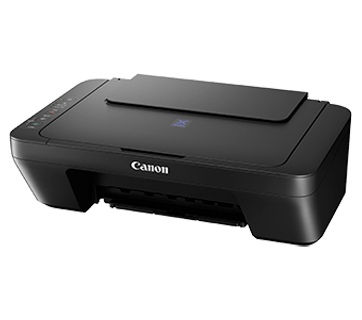


| Print Head / Ink | |
| Type | Fine Cartridge |
| Number of Nozzles | Total 1,280 nozzles |
| Ink Cartridges | PG-47, CL-57S (Optional: CL-57) |
| Maximum Printing Resolution | 4800 (horizontal)*1 x 1200 (vertical) dpi |
| Print Speed*2
Based on ISO/IEC 24734 |
|
| Document (ESAT/Simplex) | Approx. 8.8 ipm (black) / 4.4 ipm (colour) |
| Printable Width | Up to 203.2 mm (8 inch) |
| Printable Area | |
| Bordered Printing | Top margin: 3 mm, Bottom margin: 16.7 mm, Left/Right margin: 3.4 mm (LTR: Left: 6.4 mm, Right: 6.3 mm) |
| Recommended Printing Area | |
| Top Margin | 31.6 mm |
| Bottom Margin | 29.2 mm |
| Paper Size | A4, A5, B5, Letter, Legal, 4×6″, 5×7″, Envelopes (DL, COM10), Custom size (width 101.6 – 215.9 mm, length 152.4 – 676 mm)
* F4 is possible via custom size settings.
|
| Paper Handling Rear Tray (Maximum Number) | |
| Plain Paper | A4, A5, B5, Letter = 60 Legal = 10 |
| Photo Paper Plus Glossy II (PP-201) | 4×6″ = 20, 5×7″ = 10 |
| Glossy Photo Paper (GP-508) | 4×6″ = 20 |
| Envelope | European DL / US Com. #10=5 |
| Paper Weight | |
| Rear Tray | Plain Paper: 64-105 g/m², Canon specialty paper: max paper weight: approx. 275 g/m² (Photo Paper Plus Glossy II, PP-201) |
| Ink End Sensor | Dot count |
| Print Head Alignment | Manual |
| Scanner Type | Flatbed |
| Scanner Method | CIS (Contact Image Sensor) |
| Optical Resolution*4
Optical resolution scan is available, only when you use TWAIN Driver. |
600 x 1200 dpi |
| Selectable Resolution*5 | 25 – 19200 dpi |
| Scanning Bit Depth (Input/Output) | |
| Grayscale | 16 bit/8 bit |
| Colour | 48 bit / 24 bit (RGB each 16 bit / 8 bit) |
| Line Scanning Speed*6 | |
| Grayscale | 1.2 ms/line (300 dpi) |
| Colour | 3.5 ms/line (300 dpi) |
| Scanning Speed*7 | |
| Reflective (A4 Colour / 300dpi) | Approx. 19 sec |
| Maximum Document Size | |
| Flatbed | A4/LTR (216 x 297 mm) |
| Maximum Document Size | |
| Flatbed | A4/LTR (216 x 297 mm) |
| Compatible Media | |
| Size | A4, Letter |
| Type | Plain Paper |
| Image Quality | Plain Paper: Draft, Standard |
| Copy Speed*8
Based on ISO/IEC 24734 |
|
| Document (sFCOT/Simplex) | Approx. 30 sec |
| Document (sESAT/Simplex) | Approx. 1.8 ipm |
| Multiple Copy | |
| Black/Colour: | 1 – 21 pages |
| Windows 10 / 8 / 7 SP1, Windows Vista SP2
Mac OS X 10.8.5 and later |
|
| Interface | Hi-Speed USB 2.0 |
| Operating Environment*10 | |
| Temperature | 5 – 35°C |
| Humidity | 10 – 90% RH (no dew condensation) |
| Recommended Environment*11 | |
| Temperature | 15 – 30°C |
| Humidity | 10 – 80% RH (no dew condensation) |
| Storage Environment | |
| Temperature | 0 – 40°C |
| Humidity | 5 – 95% RH (no dew condensation) |
| Quiet Mode | Available |
| Acoustic Noise*12 (PC Print) | 46.0 dB(A) |
| Power | AC 100-240 V, 50/60 Hz |
| Power Consumption | |
| OFF | Approx. 0.4 W |
| Standby (Scanning lamp is off) | Approx.1.0 W |
| Copying*13 | Approx. 9 W |
| Printing*14 | Approx. 9 W |
| Dimension (WxDxH) | Approx. 426 x 306 x 145 mm |
| Weight | Approx. 3.4 kg |
| Plain Paper (A4 pages) (ISO/IEC 24712 test file)*15 |
Standard: PG-47: 400 CL-57S: 180 Optional: CL-57: 300 |


Reviews
There are no reviews yet.