

Payment security

Encryption ensures increased transaction security. SSL technology protects data linked to personal and payment info.

payment methods

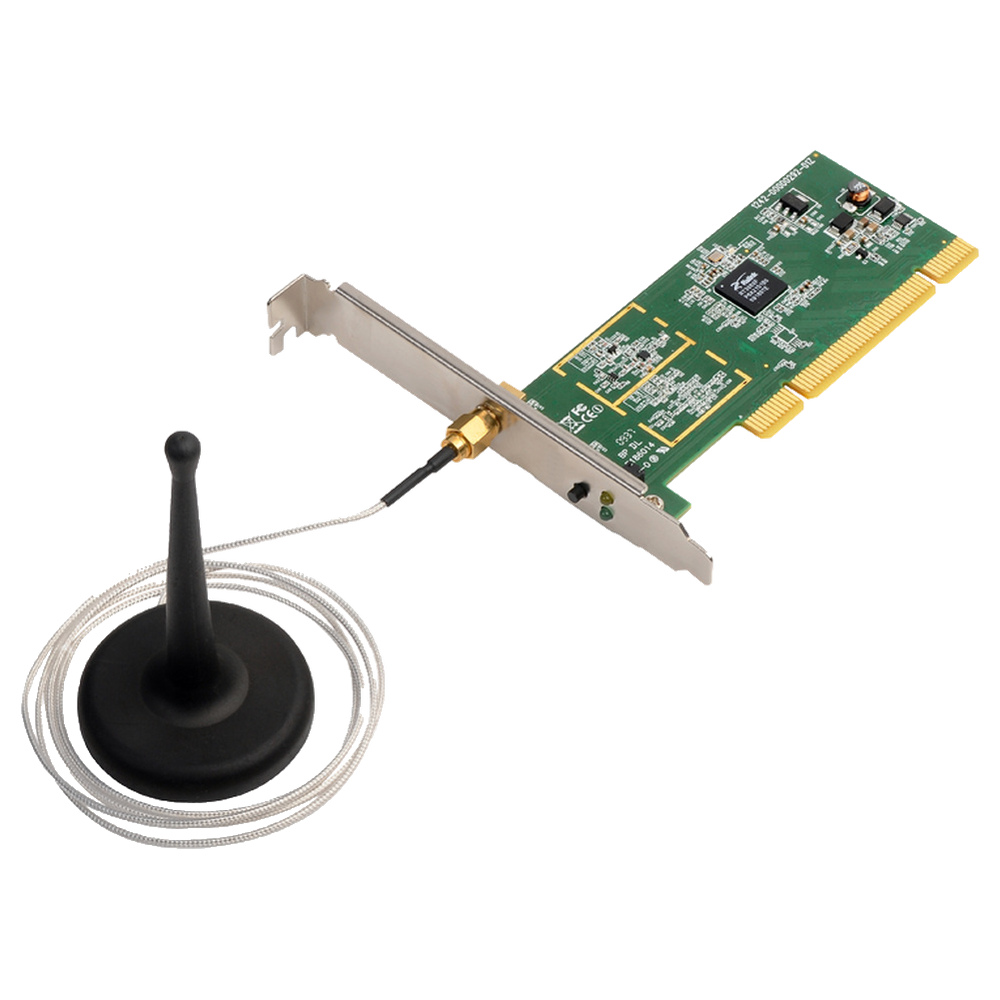
Edimax (Taiwan) N150 Wireless PCI Network Adapter – EW-7711In

The Edimax (Taiwan) EW-7711In is a n150 wireless pci network adapter featuring 32-bit PCI interface and 2.4GHz IEEE 802.11b/g/n Wi-Fi. It delivers up to 150Mbps wireless PHY rate, with WPA/WPA2, WPS, automatic rate selection and a detachable antenna arrangement.

රු 10,500.00

Need help completing your online order?We’re here to help you, step by step.

Not sure what to do next? Whether you need help choosing the right product, entering your delivery details or completing payment, our team is ready to help. Follow the steps below, or message us on WhatsApp and tell us where you’re stuck.

  1. Choose & add to cartCheck the model, specifications and warranty. Choose your options and quantity, then select Add to cart.
  2. Review your cartCheck items and quantities. Select Update cart after changes, then Proceed to checkout.
  3. Enter your detailsAdd your name, full address, town/city, postcode, phone and email. Untick Ship to a different address? if delivery is to your billing address.
  4. Review & payCheck delivery charges and your final total. Select Direct Pay, choose Place order and follow the payment instructions.
  5. Save your confirmationReturn to Richcom after payment. Keep your order number and check your confirmation email, including spam or junk. We will WhatsApp you the courier tracking code after your order has been dispatched.

Payment: Visa, MasterCard, Amex, Frimi, Ipay and Lanka-QR are listed via DirectPay. Options may vary on the payment screen. Cash on Delivery is not available.

If payment was deducted but confirmation is missing, contact us before retrying. Need installation? Use the separate appointment option on eligible products; fixing charges may apply.

Show me the checkout screens

These are real Richcom checkout screenshots, shown in black and white for easy reading and printing. Your product and total will be different.

1. Review your cartCheck your totals, then choose Proceed to checkout.
Real Richcom cart screen for online checkout
2. Add your delivery detailsComplete the required fields. Untick Ship to a different address? if we should deliver to your billing address.
Real Richcom billing screen for online checkout
3. Review and start paymentReview the total, then select Place order and follow DirectPay.
Real Richcom payment screen for online checkout

Specifications

Brand headquarters / originEdimax / Taiwan
ModelEW-7711In
Hardware Interface32-bits PCI WPS button External detachable dipole antenna (Connector: RP-SMA connector, Cable Length: 94 cm)
StandardIEEE802.11b, 802.11g, 802.11n
Frequency Band2.4000~2.4835GHz (Industrial Scientific Medical Band)
Data Rate11b: 1/2/5.5/11Mbps 11g: 6/9/12/24/36/48/54Mbps 11n: (20MHz): MCS0-7 (up to 72Mbps) 11n: (40MHz): MCS0-7 (up to 150Mbps)
InstallationMulti-language EZmax Setup Wizard
LedLink, Tx/Rx
Wireless SecurityWEP 64/128, WPA, WPA2 Cisco CCX Support Software WPS configuration
Dimensions22(H) x 128(W) x 121(D) mm(without antenna)
Humidity & TemperatureMax. 95% (Non Condensing) Operating : 32~131°F (0~55°C) Storage : -4~149°F (-20~65°C)
System RequirementsWindows 2000/XP/Vista/7/8, Linux and Mac OS
Output Power11n: 15dBm±1.5dBm, 11g: 15dBm±1.5dBm, 11b: 17dBm±1.5dBm
CertificationsCE, FCC, WiFi

Key Features

  • Add 2.4GHz Wi-Fi to a desktop with a compatible PCI slot.
  • Connect to supported 802.11b/g/n wireless networks.
  • Position the cabled external antenna for the installation.
  • Configure compatible wireless security and WPS settings.
  • Check connection and activity through the card indicators.

Product Information

EW-7711In is a legacy wireless network adapter for desktop computers with a conventional 32-bit PCI slot. Its N150 radio supports maximum negotiated link rates of 150Mbps with compatible 802.11n equipment and channel settings. Real application throughput is lower and depends on signal conditions, interference and the access point.

This card requires a PCI slot rather than PCI Express. Install a driver that matches both the card revision and operating system; the listed Windows, Linux and Mac support refers to the manufacturer’s historical drivers and does not establish compatibility with current releases. The external RP-SMA antenna has a documented 94cm cable. A compatible wireless network is required; no router or Internet service is included.
Weight0.15 kg

Reviews

There are no reviews yet.

Only logged in customers who have purchased this product may leave a review.

connector
compatibility
service
check