

Specifications
| Brand headquarters | ATEN — Taiwan |
|---|---|
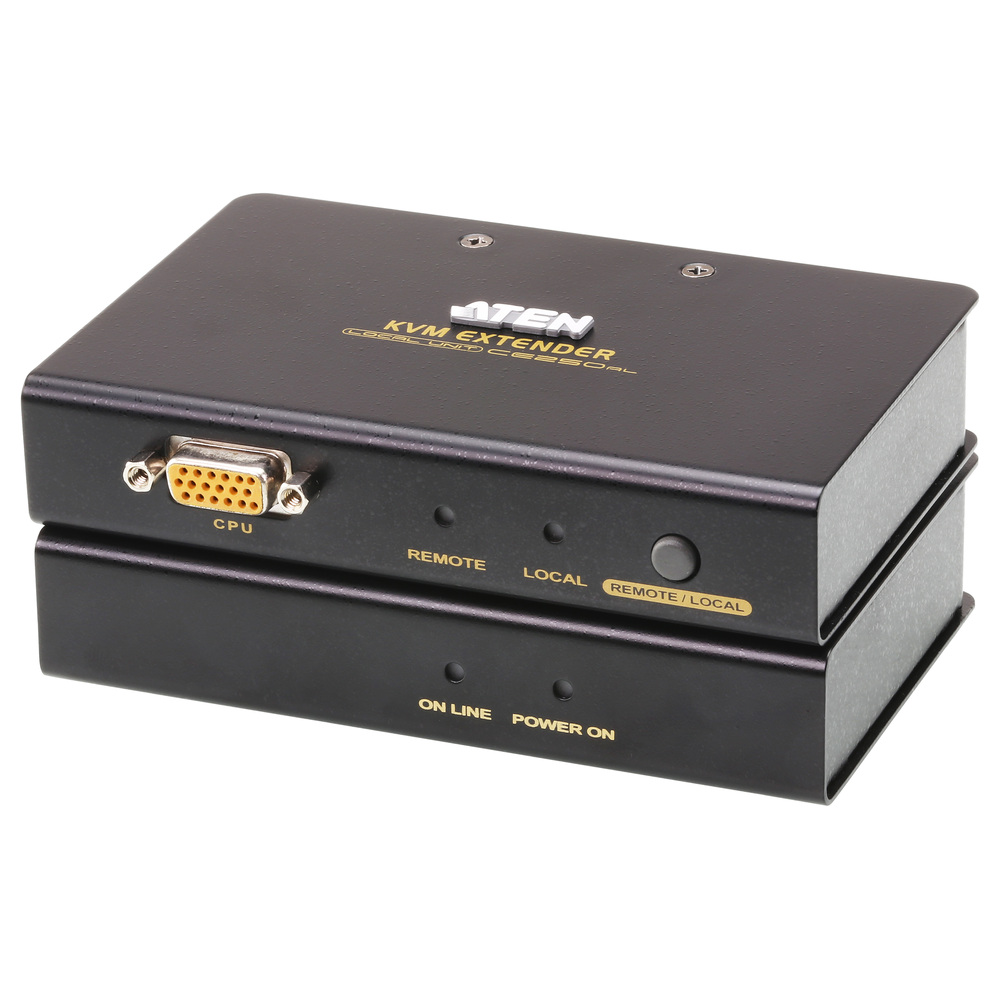
| Model | CE-250A |
| Console Selection | CE250AL: 1 x pushbutton; CE250AR: 1 x pushbutton |
| Connectors — Console Ports | CE250AL: 1 x PS/2 keyboard female; 1 x VGA HDB-15 female; 1 x PS/2 mouse female; CE250AR: 1 x PS/2 keyboard female; 1 x VGA HDB-15 female; 1 x PS/2 mouse female |
| Connectors — KVM Ports | CE250AL: 1 x SPHD-15 female; CE250AR: N/A |
| Connectors — Power | CE250AL: 1 x DC jack; CE250AR: 1 x DC jack |
| Connectors — Unit To Unit | CE250AL: 1 x RJ-45 female; CE250AR: 1 x RJ-45 female |
| LEDs — Local | CE250AL: 1 (green); CE250AR: N/A |
| LEDs — Remote | CE250AL: 1 (green); CE250AR: N/A |
| LEDs — Power | CE250AL: N/A; CE250AR: 1 (green) |
| LEDs — Online | CE250AL: N/A; CE250AR: 1 (green) |
| Emulation — Keyboard / Mouse | CE250AL: PS/2; CE250AR: PS/2 |
| Video | CE250AL: 1280 x 1024 @ 60Hz at 150 m; DDC, DDC2, DDC2B; CE250AR: 1280 x 1024 @ 60Hz at 150 m; DDC, DDC2, DDC2B |
| Power Consumption | CE250AL: DC5V:0.62W:7BTU/h; CE250AR: DC5V:1.21W:10BTU/h |
| Emulation — Power Measurement Note | Watts indicate typical consumption without external loading; BTU/h indicates fully loaded consumption. |
| Environmental — Operating Temperature | CE250AL: 0–50°C; CE250AR: 0–50°C |
| Environmental — Storage Temperature | CE250AL: -20–60°C; CE250AR: -20–60°C |
| Environmental — Humidity | CE250AL: 0–80% RH; CE250AR: 0–80% RH |
| Physical Properties — Housing | CE250AL: Metal; CE250AR: Metal |
| Physical Properties — Weight | CE250AL: 0.33 kg; CE250AR: 0.32 kg |
| Physical Properties — Dimensions (L x W x H) | CE250AL: 12.70 x 8.66 x 2.63 cm; CE250AR: 12.70 x 8.15 x 2.63 cm |
| Supplied accessories | 1 x CE250AL local unit; 1 x CE250AR remote unit; 1 x VGA/PS/2 KVM cable, 1.8 m; 1 x power adapter; 1 x mounting kit; 1 x user instructions; 1 x grounding information card |
| Store warranty | 3 YEARS WARRANTY |
Key Features
- Place the operator console up to 150 m from the computer.
- Carry supported KVM signals over a single Cat 5e link.
- Use the supplied local and remote units as a matched pair.
- Adjust the installation to the documented video and distance limits.
- Keep the computer in an equipment area while retaining console access.
Product Information
Move a compatible computer console up to 150 m away using the local and remote units with a suitable Cat 5e cable. Keeping the computer in a rack or secure equipment area can free the operator position from equipment noise and clutter. Select the cable route and video mode together, since the supported resolution is tied to the link distance.
Use compatible PS/2 keyboard and mouse connections. The local unit can use computer power; a suitable optional local adapter may be needed if that power is insufficient. The remote power adapter is included. The inter-unit Cat 5e cable is not listed in the supplied package and must be purchased separately. This is a dedicated KVM link, not an Ethernet network connection.
Included: 1 x CE250AL local unit; 1 x CE250AR remote unit; 1 x VGA/PS/2 KVM cable, 1.8 m; 1 x power adapter; 1 x mounting kit; 1 x user instructions; 1 x grounding information card.
Reviews
There are no reviews yet.